Search results for

#iPad

#1 Click this link to see News Photos page --> 01/29/2010 #3

Apple CEO and huckster Steve Jobs presents the iPad at the Moscone Center in San Francisco, Wednesday, Jan. 27th, 2010.
#AppleInc #iPad

MjL

#2 Click this link to see Political Cartoons page --> 02/03/2010 #4

NOT! The #iPad can’t multi-task, has no conventional way to import data as in no USB or Serial ports, it is hard on the eyes, doesn’t use anything but proprietary protocols (Apple or nothing), stuck using crappy AT&T service, and sounds like a female hygiene product.

MjL

#3 Click this link to see News Photos page --> 04/05/2010 #1

A line of customers waiting to purchase the iPad wraps around Apple Computer’s North Michgan Avenue store in Chicago on April 3rd, 2010. Apple’s new tablet device went on sale Saturday at the company’s more than 200 retail outlets in the United States, as well as many Best Buy stores.
#iPad

MjL

#4 Click this link to see Blog page --> 11/01/2012

Tracey had to work a split day yesterday. She went in for a while in the morning and had to go back at 5 p.m. until closing at around 9 p.m.

We had lunch together at Bob’s in Pekin, then we went over to the #Verizon store and ordered her a new #iPad. That was really disorganized.

Since we don’t get our cell phone through them the guy seemed perplexed about how to order the darn thing (they didn’t have it in stock, of course).

Then it got further complicated when Tracey told him we didn’t want a service contract so he had to start over. I know he asked for her information at least three times, including her driver’s license and social security number.

The place is really not set up very well. They have this long counter and there is way too much noise with all the people talking at the same time.

There was only one other customer there but about five or six salesman all gabbing, telling jokes, laughing etc. I felt more like I was at the local bar instead of a phone store.

The new gadget is supposed to be delivered to our house the first of next week. I hope we never have to go back to Verizon.

MjL

#5 Click this link to see Blog page --> 11/03/2012

Tracey’s #iPad showed up yesterday via #FedEx. I was really tempted to mess with it but all I did was plug in so it would be all charged up for her. I knew setting it up would be fun but it should be her fun, not mine. I sent her an email and a text so she would know it had arrived. We hadn’t expected it until next week.

MjL

#6 Click this link to see Blog page --> 11/04/2012

OK then —— one day with the #iPad and Tracey is losing it. She was on her lap top and couldn’t get it to do anything by touching and poking at the screen like she does on the iPAD. She is forgetting how to use the mouse and keyboard?

MjL

#7 Click this link to see Blog page --> 11/06/2012

I sent an email to our insurance agent asking to have Tracey’s new #iPad insured specifically for loss, damage, or theft with no deductible. It only costs a few dollars a year to do that and I think it is a good investment.

MjL

#8 Click this link to see Blog page --> 11/19/2012

I’ve been spending a lot of time with my little laptop (Dell Duo). I usually only use it when the power goes off (I take it to Bob’s or somewhere else with electricity and Wifi) or when I am away from home for more than a day.

It has been sitting on the charger so long I am afraid the battery might be toast. It took me a while to get all the software updates installed and to get reacquainted with how it works.

It really doesn’t work too well as a tablet, especially compared to the very sensitive screens like Tracey’s #iPad.

MjL

#9 Click this link to see Blog page --> 06/25/2013

I discovered something new yesterday while fooling with Tracey’s iPad. Some of the pictures on the Blog were showing up in the wrong orientation. After a couple Googles I found the #iPad and some others orient a picture according to the EXIF information embedded in the photo file rather than the actual orientation of the picture as loaded. So I spent a while yesterday afternoon correcting and uploading a lot of my Blog pictures so they will be correctly oriented on those backwards technologies. It is always something. So if you happen to see a waterfall picture on the Blog that is sideways or something, please let me know so I can correct it!

MjL

#10 Click this link to see Blog page --> 06/26/2013

I have to add another errand to the list —— Tracey’s #iPad suddenly lost connection with the SIM card it uses to access the #Verizon 3G network. After some reboots and re-seating the card there has been no joy —— so I will get to take it to the Verizon store in Pekin for some diagnosis.

MjL

#11 Click this link to see Blog page --> 06/27/2013

The time spent at #Verizon didn’t cost any money but it took about twenty minutes for them to discover that somehow the system had “lost” Tracey’s #iPad information. So a new SIM card was installed and after some time spent typing everything into the system —— it was back to working again. I was assured nothing was changed on her plan. We shall see.

It is hard to be optimistic about a business that is so incompetent it loses its service connections without explanation. I wonder why they never lose the ability to send the bill?

MjL

#12 Click this link to see Blog page --> 10/31/2013

Today is the one year anniversary of Tracey’s #iPad purchase. I don’t think it has been out of her sight since, so I guess she kinda likes it?

MjL

#13 Click this link to see Blog page --> 12/04/2014

Still no Internet on our DSL but I am using Tracey’s #iPad as a hotspot. That’s the only time I don’t make fun of it. I guess I will have to call the #Frontier maintenance people —— again.

MjL

#14 Click this link to see Blog page --> 08/16/2015

Aaron dropped by later in the afternoon to pick up some more stuff and also to show off his new #iPad mini. Tracey thinks it is pretty sweet and I wouldn’t be surprised if she starts pricing one for herself.

MjL

#15 Click this link to see Blog page --> 10/21/2015

Tracey noticed a few days ago that she had no connection to #Verizon cell service with her iPad.

She called yesterday morning and spoke with a young man with a very foreign accent. She had the conversation on speaker phone and I was very impressed with her ability to translate what he was saying —— I could hardly understand a word he said.

Eventually they got her #iPad reset and she was getting a connection again. He even added 300 meg of data to her plan which was nice since I used up most of her data because our #Frontier DSL still isn’t working correctly.

Just another day in the life ——

MjL

#16 Click this link to see Blog page --> 05/15/2016

Tracey is really interested in getting a new #iPad Pro. She has spent a lot of time on the Internet researching them and we went to #Staples to check them out last evening. They have sales models on display but of course the large screen model was bolted to the table so you couldn’t pick it up to feel its weight and size.

I called one of sales guys over and he was good enough to go to a back room and bring out one for Tracey to check out. We spent a few minutes comparing the two sizes and talking with the sales guys.

MjL

#17 Click this link to see Blog page --> 05/24/2016

Tracey has begun ordering accessories for the new #iPad she doesn’t have yet. She is taking this Friday off and we will probably spend the day at cell phone stores buying a new iPad. I have to admit she spends a lot of time researching before she buys and she is happier with what she gets in the long run.

I may inherit her old iPad. At least for a while. I thought I would spend a little time with it to see if I CAN like it. I have been pleasantly surprised that Windows 10 doesn’t suck as much as I thought it would so maybe the iPad will turn out the same?

MjL

#18 Click this link to see Blog page --> 05/27/2016

We went to the #USCellular store in Pekin after Tracey got off work yesterday. It was surprising to see we were the only customers in the store when we got there.

After a little discussion about options and plans Tracey had the salesman begin the process of purchasing a new #iPad Pro. True to our usual bad luck things went haywire from there. The ordering system got locked up and after an hour of phone calls and keyboard pounding the salesman told us we should just leave and he would eventually get it ordered for us.

I actually think the sales guy was more upset than we were —— we have grown accustomed to these things since they seem to happen so frequently. We must have our own personal gremlin that jumps in to screw things up.

A couple hours after we got home I got an email that we should expect a shipment from UPS today. This was from UPS, not U.S. Cellular, so we can only hope we get what was actually ordered. And only one of them.

We will have to go back to the store after we receive the iPad in order to get the cell service activated, sign papers, pay the bill, etc. That will hopefully be today. And hopefully the gremlin will give us a break.

MjL

#19 Click this link to see Blog page --> 06/01/2016

Some more of Tracey’s #iPad attachments and accessories arrived yesterday. She now has a bag to carry it in and covers for front and back. Also an Apple Pencil. This is a cool blue tooth gadget that lets her draw and write on the iPad with incredible control of line width, color, etc. She spent most of last evening experimenting with it to mark up her work calendar, make notes, etc. My girl is really a tech nerd when it comes to her iPad.

MjL

#20 Click this link to see Blog page --> 06/05/2016

Since Tracey got her new #iPad I inherited her old one. I spent too much time messing with it yesterday. I downloaded all her photos off of it and sorted through them for a while.

I think the iPad filing system was put together by a bunch of drunken fourth grade kids. I have never seen a more convoluted method that ends up duplicating things all over the place. Very wasteful of memory.

And it seems every app has a different keyboard and method of cut, paste, delete, etc. I spent way too much time on Google trying to get directions to do things that are not at all intuitive. The entire system seems geared toward just letting the machine run you instead of the other way around. Frustrating.

I also found it odd that many of the suggestions to fix problems, delete photo albums, etc. was to hook the thing up to a PC and use iTunes. So what good is an iPad if you have to buy a desktop too? Odd.

I can see it could be nice to quickly check email, etc. once I get it set up. Not at all productive for any real computing.

I ended up going out to mow grass just to get away from the thing.

MjL

#21 Click this link to see Blog page --> 06/11/2016

For any iPad users out there —— Tracey found a great browser for #iPad called Dolphin. Really works well and has built in ad blocker, desktop mode, and a customizable gesture interface. Although we haven’t worked with it much it does seem better than Safari or Chrome thus far.

MjL

#22 Click this link to see Blog page --> 06/01/2018

There will be no Twitter Roundup today because I have been shut off by #Frontier DSL. Service was supposed to be switched over to the trailer later today but they must have disconnected service here already. I am using my phone for an Internet connection and have limited bandwidth.


Things went from bad to worse. Shortly after activating the hot spot on my phone it locked up and the Internet connection died. So no Internet and no phone.

The #Blog will be greatly delayed in updates until I get this sorted out. I am using Tracey’s #iPad to connect for now.

It is always something.

MjL

#23 Click this link to see Blog page --> 06/02/2018

#TheBigMove
#Frontier got us again. After waiting for hours and hours for a technician to show up we finally hooked up the modem ourselves. It works but the speed is very bad. Tracey called tech support and the call got passed around between tech support and customer support until we were told somebody would be out to fix it Monday. So we don’t have Internet at either house now.

The #DirecTV guy showed up on time and connected our service in less than an hour. Very prompt and professional. Frontier could learn a lot from them.

Now we have TV service at the trailer with a dinky TV and nothing to sit on but kitchen chairs and I’m using my cell phone to connect to the Internet. There won’t be much Internet use before I use up all the bandwidth.


I forgot to mention that Tracey used her #iPad as a hot spot for me yesterday long enough to Google the problem with my phone lock up and I managed to push and hold for 7 to 10 seconds the proper sequence of buttons to reboot it. So far it has been working fine.

MjL

#24 Click this link to see Twitter Roundup page --> 09/04/2019 #2

#AppleInc #iPad
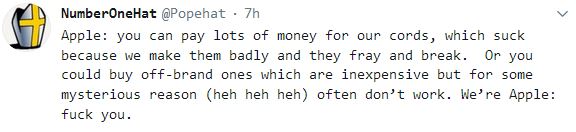
The struggle is real. Tracey goes through iPad power cords a lot.

MjL

#25 Click this link to see Blog page --> 11/11/2020

I have some circulation issues with my legs so I shouldn’t sit at the computer desk for too long. I have been using Tracey’s #iPad while sitting in my recliner. I’m not very good with either the keyboard or the pencil. So expect some typos.

MjL

#26 Click this link to see Blog page --> 11/13/2020

On Nov 7th I ordered an Apple pencil to use on Tracey’s old #iPad.
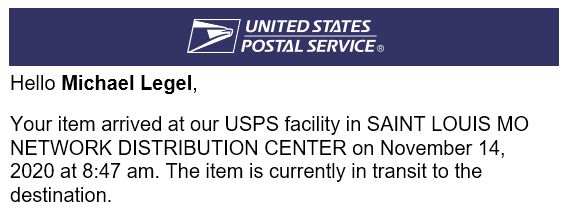
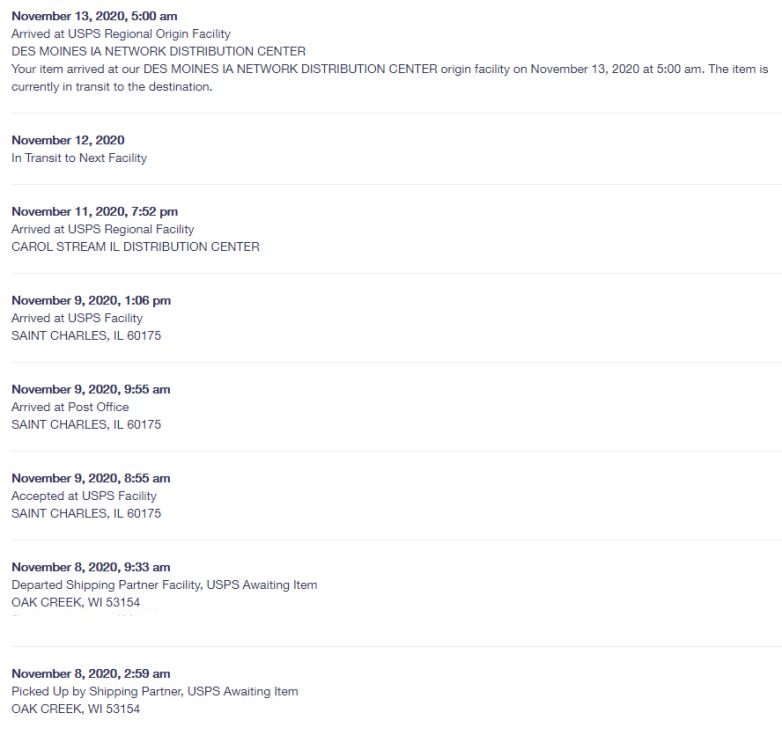
It has since traveled from Oak Creek, WI, to near St. Louis, MO, (where it was lost for three days) to near Chicago, IL, and now to Des Moines, IA. (Post office tracking information)

I wonder if it will get to me?

MjL

#27 Click this link to see Blog page --> 11/13/2020

Another notification from USPS, my package has left Des Moines, wonder where it will go to next? #iPad

MjL

#28 Click this link to see Blog page --> 11/14/2020

My #iPad pencil has gone full circle from St. Louis to Des Moines and back again.

MjL

#29 Click this link to see Blog page --> 11/14/2020

I’ve spent enough time with the #iPad now to conclude that a major flaw in the software is the belief it is easier to make me hunt thru numerous help screens to figure out their reverse upside down logic rather than trouble themselves to write intuitive commands.

If I really want to get anything done, I end up back at my desktop.

MjL

#30 Click this link to see Blog page --> 11/14/2020

The #iPad pencil left St. Louis, wonder where it’s going now?

MjL

#31 Click this link to see Blog page --> 11/16/2020

One quirk of this #iPad pencil is that it won’t allow me to intentionally misspell words. I write “Repuglican” and it corrects it to Republican. Same thing with Dimocrats. I have to use the keyboard to fix it.

MjL

#32 Click this link to see Blog page --> 06/02/2024

Tracey’s #iPad has expired. It refuses to charge. We don’t know if it is the charging port or the battery. She’s used it every day for almost ten years now so I guess it served her pretty well as far as most modern gadgets work. We ordered her a new one.

MjL